
Surplus sits idle
Monitors, pumps and furniture wait in storerooms after upgrades and closures, losing value every month.
MatchPort connects unused hospital equipment with the departments that need it, across every site. Its AI assistant fills in a listing from a photo.


Trailer
The problem
Monitors, pumps and furniture wait in storerooms after upgrades and closures, losing value every month.
A new purchase order goes out for equipment another department is already trying to give away.
Without one shared list, nobody can see what's available beyond their own floor.
How it works
MATCH PORT ASSIST, the built-in AI assistant, recognizes the equipment in your photo and fills in the listing: manufacturer, model, description, condition and price. Review it, add your cost center and publish.
MatchPort checks purchasing history and puts each listing in front of the departments that are most likely to buy it.
A department requests the item, approvers sign off in the app, and the handoff is tracked to completion.
Features
MATCH PORT ASSIST reads your photos, identifies the manufacturer and model, and fills in the listing for staff to review, so specs rarely need typing by hand.
Get matched to listings based on what your department actually uses: similar products, accessories, and alternatives.
Requests route to the right approvers automatically, and terminal approvers can hand final approval to their direct reports.
Ask questions about a listing and coordinate pickup without leaving the app.
Track transfers, savings, waste avoided and labor hours by department and site.
Track every request from approval to handoff, and confirm delivery in one tap.
Product tour
Your department at a glance
Every published listing
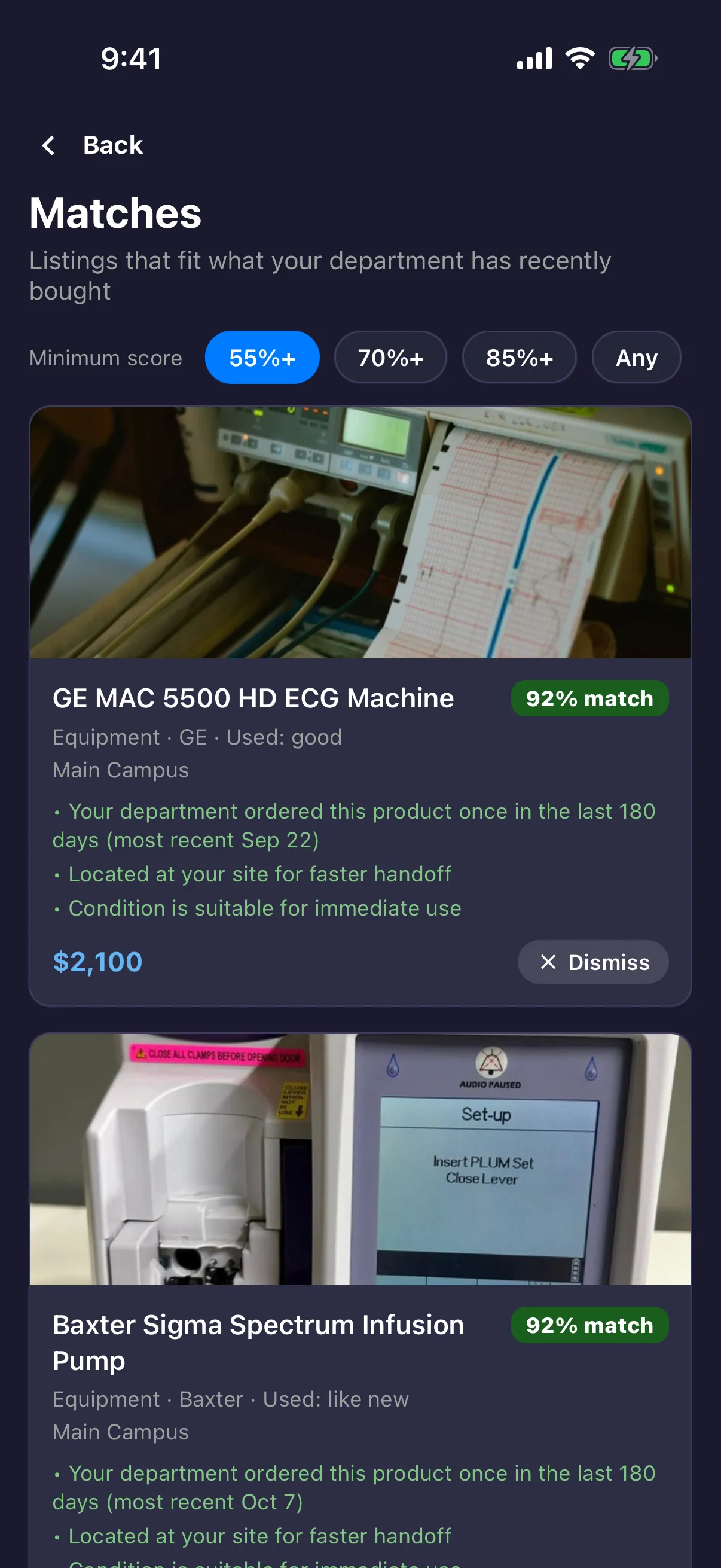
Ranked for your department
Request in a few taps
Our team
Founder
MBA, BSEE, BSBME. Healthcare leader of over 30 years.

Co-Founder & CTO
Software Engineer, BS in Computer Science

Clinical Advisor
RN, DNP, NE-BC

Advisor
Product development executive. Executive MBA (USC), PMP.
Book a walkthrough and see MATCH PORT ASSIST and purchase-history matching on your own equipment.
FAQ
A 90-day free trial with the full product, and no implementation fee. After that, one low flat annual license: unlimited users, departments, listings and transfers, with no per-transfer charges, no seat counts and nothing metered. You know exactly what your fixed cost is.
You decide on the license after day 75, with your own savings numbers from MatchPort in hand.
Nothing! Walk away at the end of the trial and you pay nothing. You keep your full transfer history and the savings documented for every transfer.
This is the problem MatchPort was designed around. Publishing an item takes three steps:
That’s faster than sending the “does anyone need this?” email.
The platform is designed to incentivize, encourage and empower users to be vigilant with cost saving in mind! Users, both the people who list items and the people who request them, see every transfer and the savings tied to them in their own analytics, ready to present during their annual evaluation.
Staff aren’t asked to do extra work for the hospital’s benefit; they’re building their own documented cost-saving track record.
Sharing platforms lend equipment between facilities temporarily. Resale vendors monetize what leaves your building. Inventory tools count what you have. MatchPort does the thing none of them do: it permanently re-homes surplus equipment, supplies and furniture from department to department, before anyone buys new, with documented savings and individual staff credit.
Every published item stays open to every department in your organization, and MatchPort suggests it to the departments that buy the same or similar products. When you list an item, you can also list it as a donation.
Every transfer is recorded end to end: the item and its value, both departments, who requested it, each approval with its decision and time, and the confirmed delivery. Analytics show the totals by site, department or person, and your team can open any transfer to check it. Purchasing or your auditor can spot-check any sample against actual quotes.
The methodology is given to you in writing before the trial starts.
Very little, deliberately. Your champion sends two things: your staff email domain and a department list with managers (decision makers) for each department. Purchasing and Biomed name the people who approve transfers. Departments download the app and attend a 30-minute “train the trainer” orientation. No ERP or EHR integration, no PHI risk, no new hardware, no consultants. Typical timeline: live in 10 business days, first transfer in week two.
Your managers and your Purchasing and Biomed approvers review transfers, and any of them can reject an item they consider unsafe or non-compliant, with the reason recorded. This is the same as your current internal workflow.
Real, and deliberately conservative. Every completed transfer updates live totals for pounds diverted from landfill, donation value and an ESG score.